
We’ve all been there as users. You want to share an interesting link – say, an article. But hang on, the link on Facebook might look something like this:

Suddenly, you don’t know exactly what you’re sharing; the image and any description are missing. The image above shows internal software that we use at AITOM for timesheets. Obviously, no one will ever share that, so it doesn’t matter that it has no metadata. However, for a blog or an e-shop, this should be unthinkable.
It will no longer be possible to edit metadata when sharing. Once Facebook loads the post, it will share it as is. Only paid adverts can be edited.
A marketer’s nightmare, less work for users
Online marketers are thus facing somewhat bleak times. If their pages aren’t perfectly prepared by developers, their hands will be tied. Conversely, the change should make things significantly easier for users.
Facebook’s primary concern is the interests of its users. If a user has to edit a link, it’s a nuisance, so Facebook is essentially instructing developers to do this work on the user’s behalf. Furthermore, Facebook hopes that such measures will help combat the spread of fake news.
How to prepare for hassle-free sharing?
Developers will need to incorporate the change into the content management system. There are essentially two options:
- Developers can code which image is to be shared and with what text. In the case of blogs, this would involve specifying the headline and lead, for example. The disadvantage is that you then have no option to edit these descriptions.
- Add Open Graph meta tags to the existing settings. This is the option we recommend.
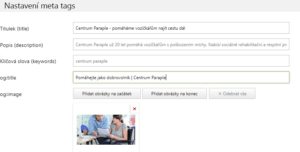
In AITOM, within the AitomCMS A5 content management system, you will find the so-called OG meta tags. In addition, our developer always sets a generic OG image, title and description. These are applied to pages that do not have their own OG meta tags. This is what the settings and subsequent application of OG meta tags look like.

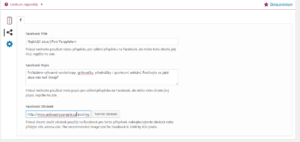
OG meta tags can also be configured in WordPress. In the Yoast SEO plugin, the settings look like this:
Google also retrieves meta tags from the OG fields for its networks (Google, Google News, etc.)
What OG meta tags are there?
- og:image – the image being shared. Size is important; upload an image with dimensions of 1200×628 px (this is the optimal size for Facebook)
- og:title – title; generally, this should not exceed 70 characters
- og:description – description of up to 155 characters
- og:type – the type of page you are sharing. For example, label a company blog as ‘article’. Complete list of all types.
- og:url – here you can set which URL will be displayed to users.
However, there can be many more meta tags. For example, for language localisation (og:locale).
Will it be possible to share your pages?
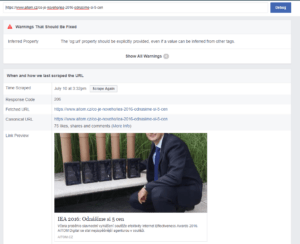
Check how your website performs when shared. Facebook’s Debugger tool can help you. It will show you what information the page is downloading and what errors you should fix.
For example, in the article about the IEA, we have an incorrect image. When we shared the article, we uploaded a special photo for it so that it would better match the required dimensions.
Don’t delay in making these changes. Posts will no longer be editable from 18 July 2017. As usual, Facebook will be rolling out this change gradually.