
The text must be legible
That sounds obvious, but for many websites it isn’t. Our eyes have certain limitations, and these must be taken into account.
The basis of scannable text is a sufficiently large font that makes reading possible. If you don’t know what font size you have on your blog or e-shop, check with your developer. For standard text, a font size of 16px is most commonly recommended. For headings or buttons, an even larger size is often used.
What does a 16px font look like?
Lorem ipsum dolor sit amet, consectetur adipiscing elit. Vivamus id faucibus quam. Morbi ultricies ullamcorper lacinia. Interdum et malesuada fames ac ante ipsum primis in faucibus. In ac mi in ex consequat tempor. Vivamus vestibulum ligula et est vulputate, eget tincidunt libero elementum.
What does a 20px font look like?
Lorem ipsum dolor sit amet, consectetur adipiscing elit. Vivamus id faucibus quam. Morbi ultricies ullamcorper lacinia. Interdum et malesuada fames ac ante ipsum primis in faucibus. In ac mi in ex consequat tempor. Vivamus vestibulum ligula et est vulputate, eget tincidunt libero elementum.
In practice, the code does not use pixel sizes, but the value ‘rem’ – that is, a dimension corresponding to the value of the HTML element ‘font-size’ in the code. The size is then specified in multiples. For example, a heading might be 2rem in size (i.e. double the size of standard text). The base size is usually set to 16px.
Work with contrasts
Dark text on a light background is easier to read than the reverse. You don’t necessarily have to use black and white. The only important thing is that the contrast is sufficiently clear.
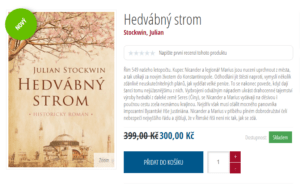
At a glance, the reader must also be able to distinguish headings
. You can choose a different font, size or colour. Ideally, a designer should suggest the layout of your headings. They can take into account the impact of colours on our psychology, aesthetics and the company’s corporate identity
.
Generally speaking, the choice of font and its characteristics should always reflect the brand and its values. Current trends also
always play a part
in font selection. A brand such as Apple will use a modern sans-serif font. Conversely, the traditional New York Times will tend to opt for a more conservative font. A Youtubering festival for teenagers, on the other hand, can afford to be even more creative. It always depends on careful consideration of the target audience’s preferences
.

7 principles for writing a readable blog
- Short paragraphs
Write short paragraphs, no more than 5 lines. In a book or newspaper, you can easily find your way around, but on a screen, you’ll get lost in a paragraph that’s too long. The ideal paragraph length is up to 80 characters, including spaces. - Keep it brief
Less is sometimes more, especially on the internet. Be as concise as possible. If you want to expand on something, it’s better to add a link to further information rather than another paragraph. As the saying goes, ‘silence is golden’ – it’s better to write nothing than to repeat clichés and well-known facts. - Headings, titles, subheadings
Break the text down into smaller sections and separate them with headings. The main heading is usually 1.96 times larger than the body text.
A heading is essentially the title of a paragraph; it should summarise what you are writing about in the following paragraph in an engaging way and encourage the user to read that paragraph. A text structure with subheadings is seen by search engines as a sign of high-quality content and earns you points in SEO. - Number
your points Bulleted and numbered lists are easier to read than a paragraph of text containing a detailed list. If there are several points, always use a numbered list. Users like to see how much more they have to read. - Only underline links
Users are used to being able to click on underlined text. If this isn’t the case, they get confused. It’s better to highlight text in bold or colour. - Never use CAPS LOCK
Because it’s simply harder to read. We don’t read individual letters, but words as a whole. Different letter shapes help us do this. Use capital letters for buttons, headings and similar short texts, but never for paragraph text.
TRY READING TEXT WRITTEN IN CAPITAL LETTERS. IT’S NOT VERY CLEAR, IS IT? NOT TO MENTION THAT CAPITAL LETTERS ON THE INTERNET MEAN YOU’RE SHOUTING. WRITING PERSONAL MESSAGES OR TEXTS IN CAPITAL LETTERS IS GENERALLY CONSIDERED RUDE. - Remember your composition lessons
Your teacher surely meant well. Remember what she advised you. Always write in the active voice. Imagine a typical marketing phrase from a manufacturing plant – which reads better?
Our products are manufactured using state-of-the-art technology. First-class materials were used in their production.
Quality is our top priority, which is why we manufacture products from first-class materials using state-of-the-art technology.
To sum up: without sensible formatting, nobody will read your text, regardless of whether we’re talking about a blog post or a product description in an online shop. So, when writing, think about how the text will read to users. If you’re unsure, carry out a mini user test. Ask a few people in the company, your partner or a couple of friends to have a look at the article and read it. Does it read well to them? Does the text seem clear to them? Then you’re halfway there. Now all that’s left is for the text to guide them towards the desired goal – perhaps a purchase.