Images play a vital role on websites. An interactive and attractive design is essential these days, as users form their first impression of a website in around 0.05 seconds
. Infographics have long been a popular way of presenting dry data. Optimising images is
, without a doubt
, a necessity.
Why optimise photos:
- Up to 90% of the information our brain processes is visual.
- 30% of users access websites via mobile phones; large images are not ‘mobile-friendly’.
- Algorithms use optimised image descriptions as supplementary data. You therefore gain SEO bonus points.
When should you take your own photos?
Images on e-shops are particularly important. Image optimisation is absolutely crucial for e-shops. Users choose products based on attractive photographs. In e-shops, photographs are an absolutely essential guide
. They must correspond 100% to the actual product. Using stock photos from a photo bank is out of the question. You should definitely consider hiring a professional studio, or even a photographer.
How can you optimise images so that search engines can find them?
Search engine crawlers automatically recognise what is in an image. However, you can help them. By optimising marketing parameters, you make it easier for them to identify and categorise the image. Technical optimisation, in turn, ensures that the image is also adapted for mobile devices.
Search engines also take context into account.
If you’re writing an article about gardening and include a photo of a family at a playground, the search engine will assume the image doesn’t belong in the text. You won’t earn any SEO points for that.
How big is big enough?
A
whole range of technical parameters
also play a part in optimisation these days. But there’s nothing to worry about – you just need to choose the right format and image size. Even a layman with no knowledge of graphics can manage it.
The image should be of the highest possible quality. There’s nothing worse than a poorly lit, pixelated image. When it comes to format, always upload bitmap JPG, PNG, GIF or vector SVG files. At AITOM, we use the SVG format exclusively for icons; images in articles are almost always in JPG format.
Always upload the image in the size you want to display it on the website. If you want an image to take up half the page, there is no point in uploading it at a resolution exceeding 2000px. At AITOM, we upload the largest photos at a width of
1024px
. You will rarely need anything larger.
Always compress
an image before uploading it; this will reduce its size without affecting its quality. You can try a very simple tool such as TinyPNG.com
, which allows you to reduce the size of multiple images at once. The original image was 500 KB – that’s far too large. It would load slowly for people on mobile devices. The compressed version is now just 68 KB. You won’t notice the difference with the naked eye:


Fill in the alt tags
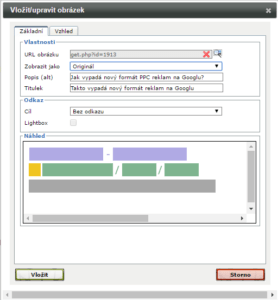
An alternative description, or ALT, is a fundamental way to optimise an image from a marketing perspective. It’s worth including a keyword in the alt text. This increases the likelihood that a search engine will display your file in response to a specific query. As with other meta tags, overloading it with keywords will only result in penalties from search engines.
ALT tags are primarily for search engine crawlers; users will only see them if the image cannot be loaded. From a user experience perspective, it is therefore worth paying sufficient attention to them. ALT tags can also be used by screen readers for users with disabilities (the blind or visually impaired).
However, you should also fill in the image title. The title appears when you hover the mouse over the image. It offers copywriters the opportunity to work more creatively with text. This is what a properly optimised image looks like – we have used the keyword ‘PPC advertising’ in the alt text.