

Read our 6 practical tips:
1/ Article headline and title
The headline and subheading largely determine the SEO success of every article. They must clearly indicate which keywords you want to target.
It is not unusual to spend far more time crafting the headline and subheading than on any other sentence in the text. Combining keywords with appeal from the reader’s perspective is not always easy. Moreover, there is no guaranteed formula. Some recommend sticking to specific, clear points, whilst others have found that general statements work well, enticing readers to find out what it’s all about.
Example: Our article is called ‘How to write an SEO article: capture the attention of both people and search engines’. That’s quite specific. You know straight away what it’s about. But it could also have been called, for example, ‘SEO article: lead a horse to water, but you can’t make it drink’. Potentially, such a title might arouse curiosity about what we actually mean. Perhaps :-). Such an approach would be worth testing.
Proven elements in headlines and titles also include, for example:
-
numbers: The 5 most well-known methods for…
-
the current year: 2021: SEO trends…
-
tips: guaranteed tips on how to…
-
so-called power words: guaranteed, magical, success, growth, benefit, change, desire…
If you feel like it and have the space, you can experiment with the format of your headline and subheading over time and test their effectiveness. The effort you put in will pay off in your Google Analytics results.

2/ How to find keywords
There are many methods for deciding which keywords you want your SEO article to target. If you don’t want to pay an SEO specialist for a detailed analysis, you can use a range of tools. Some are suitable for beginners, whilst others require a certain level of experience and practice.
To create your own unique list of relevant phrases, you can use, for example:
-
Collabim
-
Keyword Everywhere
-
Ahrefs
Each tool has its own advantages, and different people prefer different ones. You’ll discover ‘the one’ for you through practical use.
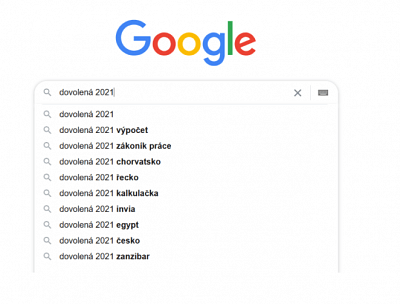
There’s one method we all have at our fingertips every day: Google’s autocomplete. Try entering phrases related to your topic, and it will suggest what other people are interested in in connection with them.
Example: What if you wanted to write an article about summer holidays?
For the word ‘holiday’, Google would suggest:
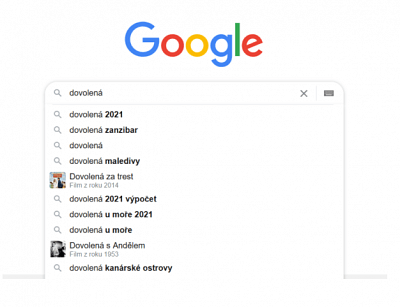
… and if you type in ‘holiday 2021’, you’ll get these suggestions:
3/ Article content
The basic rule is: write for people. Forget about SEO, CTR and other acronyms for a moment and write the article as you would want to read it yourself.
In search results, the top positions are occupied by articles with relevant content that are written in an engaging style. Search algorithms recognise them automatically, and most importantly: people actually read and share them.
Naturalness and relevance are therefore clearly the top priorities. What else should your article’s content include from an SEO perspective?
-
subheadings
-
short paragraphs of 3–5 lines
-
a readable font size
-
comfortable line spacing
-
internal links to other blog articles.
And the length? The ideal article is neither too short nor too long. It’s not enough just to touch on the topic and fill it with keywords. Search engines like articles that manage to cover the topic, provide the reader with useful information and, at the same time, hold their attention.
4/ What about images?
Images and graphic elements also play an important role in search results. Of course, they make the article more engaging and illustrate its content, but if used effectively, they can attract more readers. The key is the correct ALT text and title. Many people also search for articles via images. In this case, the ALT text plays a crucial role in whether they find your article at all. How do you do this?
-
Fill in both carefully in your blog’s content management system. You can describe every image. This helps search engines determine which topic the image relates to and where it will lead the reader.
-
Ideally, the ALT text should be 3–5 words long, contain the article’s keywords, and describe the image itself. It can sometimes be quite a challenge to come up with the right ALT text, but it’s worth the effort.
Image size also plays an important role. Images that are too large take a long time to load and lead to a higher bounce rate. It is said that an image should take no longer than 2 seconds to load. Nobody waits any longer than that. Mobile users, in particular, expect an immediate response.
You can also experiment with the placement of the image. At the end of a paragraph, it acts as a natural conclusion to the topic, whereas, for example, below a heading, it tends to disrupt the context and the flow of reading.
5/ How to write a meta description
A meta description is a short text that expands on the information in the title. It appears in search engine results and gives the user a more detailed idea of what to expect from the article. Search engines treat it in the same way. Officially, Google, for example, does not take the meta description into account when ranking results, but it uses the information contained within it to interpret the text’s content.
Ideally, it should be around 140 characters including spaces (maximum 160).

6/ Hello, I’m here
Have you finished your article? Great! Now you just need to let the world know it exists. Don’t be afraid to use various channels and don’t rely solely on search engines:
Example: What will happen to this article once it’s written? It will find a home::
-
on the AITOM blog
-
on our Facebook page
-
on our LinkedIn profile
-
and in our newsletter.
Would you like advice on your blog content or to discuss SEO for your entire website? Take advantage of our free consultation.