Google first introduced expanded text ads in July last year. The new format offers twice as much space. It works for customers. According to our results, expanded ads have a much higher conversion rate.
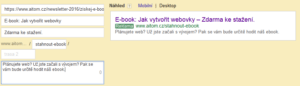
Here’s how the new format compares to the original:

You now have:
- two headline fields (purple), each with 30 characters
- a field for the ad description (grey field) with 80 characters for the ad description
- the option to customise the URL (green field) that will be displayed to users
How to write adverts that everyone will click on
Use a keyword and compelling copy in the headline
Make the most of the potential offered by the two headlines. Headline 1 is the first thing people see, so it should grab their attention. Put the most important information and a relevant keyword that users are searching for in the first headline.
In the second headline, include information that will encourage the user to click. This is a good place for a USP, or unique selling proposition. Online shops can offer free delivery, a free gift with every purchase, or the fact that all products are in stock.
You can also include a CTA – or call to action – in the second heading. For example, “Shop today with a discount”.
Learn headline writing from newspapers
Tabloids and lifestyle magazines are the best teachers. Let’s admit it: we all occasionally read an article with an enticing headline, even though we suspect in advance that it’s a waste of time. Numbers and questions, for example, work very well. Read up on how to write headlines.
Speak the language of your target audience
Use language typical of your target audience in your texts. Competitors often stick to formal English at all costs; even a small detail like this can set you apart and win you more clicks.
Don’t be afraid to use slang or informal language, provided it fits the context of the advert. Always consider the context when choosing your language. If the advert leads to a landing page written in legalese, the advert will come across as a bad joke and you’ll have wasted your money on clicks.
Prepare the page the ad will lead to
In marketing jargon, such a page is called a landing page. This page usually provides more detailed information about the offer and allows users to purchase the advertised product or service. Even a very carefully crafted advert won’t sell the product on its own. You should devote the same care to the landing page.
Make the most of the description
You’ve grabbed attention with the headline; the description is where you have the space to convince. The best way to persuade is through information and arguments. If you didn’t include a call to action in the headline, include one at the end of the description. A suitable CTA could be ‘order today with a discount’, ‘call us’, ‘download the free guide’, and so on. Simply tell the user what to do.
The description is your chance to get a click-through to the page. Think about how to stand out from the flood of adverts and offer the customer benefits that are genuinely appealing to them.
How to write a URL
The new format for entering URLs is not mandatory; you do not have to fill it in. However, it is a place where you can add further keywords.
For example, if you’re creating ads targeting competitors’ search terms, you cannot use another brand’s name (if it’s registered with Google) in the description or headline. However, this restriction does not apply to the URL.
Think about mobile users
Some users will view your ad on a mobile phone or tablet. Consider how you can make conversion easier for them. Use ad extensions such as a phone number or location.
How to rewrite all your AdWords ads
As Google stopped supporting the old version of ad copy in February, it will be necessary to review and expand all your ads.
Did you know that you can download all your ads into a CSV file and then edit them in Excel? You can then easily upload the edited ads back into AdWords. Excel allows you to work more efficiently with the same ad groups. This process will not delete or overwrite any of your ads.
How to export and edit ads
Step 1: Open the menu for the relevant campaign and click on the Ads tab.
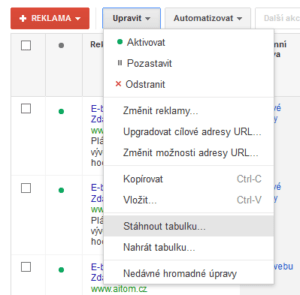
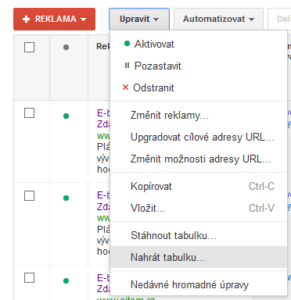
Step 2: Click Edit > Download spreadsheet.
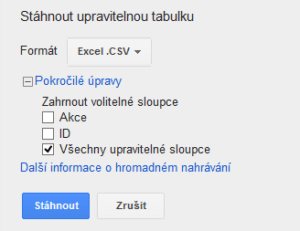
Step 3: Select the CSV format, click on Advanced options and leave only the ‘All editable columns’ option ticked. Click on Download.
Step 4: Open the file in Excel (instructions can be found here).
Step 5: Prepare the format for expanded text ads:

Step 6: In the Ad type column, change Text ad to Expanded text ad (if this is not already filled in). Leave other columns, such as Campaign type or Ad group, unchanged.
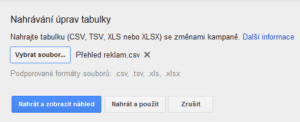
Step 7: Save the file as a CSV again and import it back:
Step 8
: Click Upload
and preview
.