

Mistake #1: The purchasing process begins on the product page
The first step begins on the product page. For a user to even reach the basket, they must first show an interest in the product and click ‘Add to basket’. Mistakes can be made at this stage too.
On the page, the user expects the following specific information: product name, detailed photos, variants (sizes, colours, etc.), availability, delivery information, price and the conversion button. Without this information, you simply won’t get anywhere.
The trend is to design the product page with a clean and simple layout. See for yourself where you’d prefer to shop. On the e-shop www.koreni-samuel.cz on the left, you’ll struggle to find the ‘Buy’ button; the page is cluttered. In contrast, the rojikovokoreni.cz page on the right has a clean layout and you can almost smell the spices.
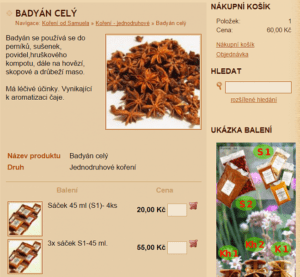
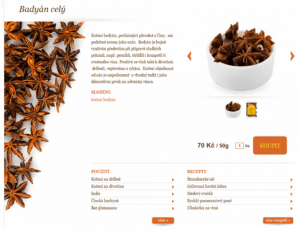
Give the user something extra at this stage; videos, 360° product photos and a catwalk (if you’re selling fashion) work brilliantly. Recommend other suitable products that might be of use to the user. This technique is called cross-selling. The value of the recommended product shouldn’t exceed 30% of the original selected product.
Mistake #2: Product reviews
Customers need reassurance that they have made the right choice. This is particularly true if you sell expensive items such as bicycles or electronics. According to Econsultancy statistics, turnover increases by 18% if you include product reviews on your website.
All major e-shops, such as Amazon or Alza, have them, some better executed than others. However, customers place far more importance on the number of reviews than on the ratings themselves. For example, if a product has 4 stars and has been reviewed by 80 people, this is far more compelling than a product with 5 stars that has only been reviewed by 8 people.
Mistake #3: Your buttons are like ghosts
A major pitfall for online shops is the so-called ‘ghost button’ – a button that blends in with the page design and isn’t particularly noticeable. Ondřej shared a tip with us: Open the product page and look at it from across the room. Can you see the button? Good. Can’t see it? Your button is in the wrong place.
Of course, a prominent button shouldn’t be an eyesore. It could, for example, be in the same colour as the logo, as seen on the Lindex fashion website.
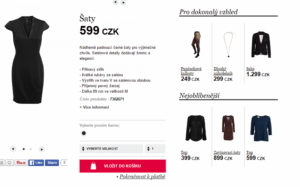
Mistake #4: Guide the customer through the purchase
Show the customer what to expect. Add a progress bar to the shopping basket. The progress bar shows how far the customer has got in the order process and what steps are involved. Start with simple questions (such as an email address), and finish with the important ones (payment method).
Here’s an example of the progress bar used by the popular fashion e-shop Zoot. The customer knows there are three steps ahead. At the same time, they are constantly reassured that everything is fine – they can return the goods, delivery is free, and so on.
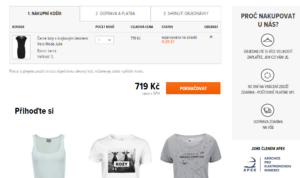
Ideally, nothing in the customer’s basket should distract them from their purchase. The only option to click should be the ‘Continue’ button. Eliminate other distractions – they’re not needed here. Experiment with the button text too. Tell the user straight away what to expect in the next step. Instead of “Continue”, use text such as “Select delivery” and so on.
Do you require mandatory registration at this stage? You’re losing up to 25% of conversions. If you insist on registration, ask for it at the very end, after the customer has submitted their order. Be friendly and personable. Which sounds better to you?
-
Do you shop often? Register.
-
Thank you for your purchase. We’re delighted to meet you. Filling in your address is always a hassle, but that’s all behind you now. Want to know a secret? If you register, you’ll never have to fill in your address again. What’s more, we’ve got a 200 CZK discount ready for our loyal fans. What do you say? Shall we shake on it?
You can also register via social media.
Mistake #5: The form shouldn’t feel like a chore
Many online shops ask for pointless information, and understandably, users don’t want to fill it in. This problem applies to forms in general, not just shopping ones.
Don’t burden the customer with nonsense – what use is a salutation or age to you? It may have benefits for your marketing department, but asking for age is rather intrusive, don’t you think? Do you require a mobile phone number? Is it absolutely essential? Czechs regard their phones as very private. So if you do want it, give them a very good reason.
Ideally, the form should be in a single column. Provide a tooltip for each field. Always place the tooltip above the field, not within it. This is because when the user starts filling in the field, the tooltip disappears. Another common mistake is offering so many options that the user gets lost in them.
Incidentally, Amazon conducted an interesting experiment: they set free delivery for all countries except France, whilst the French paid the equivalent of 5 CZK for delivery. It turned out that free delivery is a compelling selling point. Turnover increased by 30% everywhere except France. Consider whether you could make use of this too.
Mistake #6: Summarise the order
Before the customer finalises their order, summarise what they are ordering and what information they have provided about themselves. Prepare a thank-you page that will be displayed to the user after they submit their order. These pages have great potential, so bring in a copywriter to work on them.
What should appear on the thank-you page:
-
A thank you
Because it’s the polite thing to do.
-
Reassurance
Reassure the customer that there is nothing to worry about. For example: “The books are on their way to you. Our readers have loved these titles, and we’re sure you will too.”
-
Another offer
Offer the user something extra of interest: a discount on their next purchase, a blog subscription, or an e-book with recipes.
-
Information on what’s next
Tell the user what to expect next. For example: “The books are already on their way to you; the postman will be in touch within two days to let you know when they can be delivered.”