
Most of our projects run on the Aitom content management system. The new version of Aitom CMS, A5 0.13.3, offers more sophisticated marketing features than previous versions and gives marketers far more options for promoting their websites. Updating the system is easy. AITOM handles updates via an automated system that uploads them directly to the server. The website remains online at all times. You won’t even notice the updates taking place. AITOM takes care of everything, including server configuration.
What the new version of AitomCMS A5 can do
#1: Duplicating pages
Previously, it was necessary to add each individual page manually. The new version can duplicate a page in two ways:
- It duplicates only the components on the page. So you’ll have the same header, content area and photo gallery. You can then add the content yourself.
- It duplicates the page along with its content. This is useful, for example, for your marketing department when conducting A/B testing.
You choose the option yourself; it takes just a few clicks. In both cases, the page is perfectly styled, responsive and ready for your users.
#2 Advanced meta tag editing
Meta tags are pieces of code used by search engines and social media platforms. The title and description are always optimised so that users can quickly see what the page contains. You could already set the most common meta tags in the admin panel.
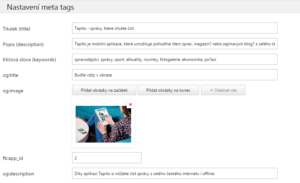
You can now also set the so-called OG:image and OG:title – these are details specifically for Facebook
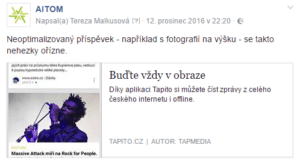
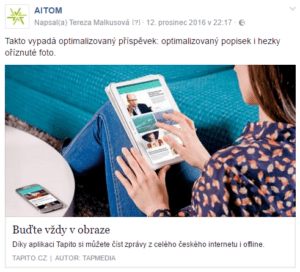
. The image accompanying a link on Facebook has a specific aspect ratio. By setting the OG image, you can be sure that whenever someone shares the page, the link on Facebook will look good. This is what optimised and automatically generated sharing looks like. It’s quite clear which of them will get more clicks.
In addition, our programmer can add any other meta tags you might need to each page within a few minutes, such as special meta tags for LinkedIn.
#3 Displaying content by user group
If a user logs in, the pages can now show them only content that is relevant and interesting to them, based on specified criteria. Menu items may also vary.
#4 Customising Google Maps
In the new admin panel, it is much easier to physically guide users to your showroom or shop. The admin panel makes
it easier to enter the API key
, which is essential. At the same time, you can customise the map a little, for example by inserting your logo instead of the standard pin.
You can also set up advanced zooming for the maps, or link them to additional information, such as details about branches. What used to require lengthy programming in older versions can now be set up easily in just a few minutes.
#5 Overview of components
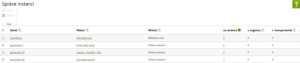
Let’s say you have a photo gallery or news component on your website. You have them placed in various locations on the site, but you don’t know exactly where. You could go through each page and make a note of where you’re using them. Or you can open instance management
in the A5 admin panel and view the exact locations of the components you’re looking for.
For example, in the image below, you can see that the Client Zone
component is used three times on the website. After clicking on the number, you’ll see a list of the specific pages where it appears.
#6 Optimisation for GTM
No website can exist without a connection to Google Analytics. For marketers, however, a direct connection to Google Analytics is somewhat inflexible. This is because any changes to the tracking must be entered into the system by a developer. A much more professional solution is to connect the website to Google Tag Manager.
In practice, all that is needed is the container ID in the AitomCMS A5 system. The marketing specialist then configures all tracking settings in Google Tag Manager (GTM). Setting up GTM requires no coding knowledge. Furthermore, GTM allows you to connect other analytical tools to the website – such as Hotjar, which measures heat and click maps.
The AitomCMS A5 content management system is one of the few that can fully communicate with the GTM measurement tool. We have set up more accurate conversion tracking for forms. Using GTM, we have configured an event, which in practice means that form submissions are counted correctly. You do not need to show users any thank-you pages; conversely, invalid form submissions (for example, if a required field is missing) will not be counted. Form submissions are clearer for administrators and faster and more convenient for users.
How do you get the updated version?
If you have paid for technical support from us (i.e. system maintenance and administration), the update is automatically included in the price. You may well already have the latest version of the system.
You can see your system version after logging into the administration panel. If you have an older version, simply get in touch with us. We plan all updates specifically for your version and, where applicable, individual components.


How does the update work?
Many of our clients view system updates as a minor nightmare. They imagine servers being taken offline for hours, thousands in lost revenue and angry customers. Nothing could be further from the truth. At AITOM, we use automatic deployment
. In practice, this means that the deployment automatically overwrites parts of the system. Neither you nor your customers will even notice that anything is happening.
Updates are rolled out incrementally by version
, so we can be absolutely certain that once we update to the latest version, you’ll have the new features implemented and everything will work. Put very simply, only the control interface changes. The graphics and content will remain exactly as you’re used to. You don’t need to change or fix anything.